Make Your Own iPhone Wallpaper
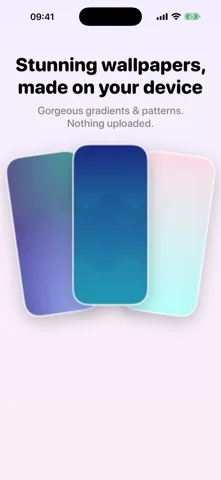
Thirteen gradients and patterns, drawn by the app at your screen's size and saved to Photos in full quality. Nothing is downloaded, nothing is uploaded, and what you preview is exactly what you get.

Free on the App Store · iPhone, iOS 17.0 or later
The free packs
Gradients and Minimal, seven designs, no subscription.
Peach
Dusk
Mint
Plum Glow
Ink
Paper
Dotted
The Wallby Pro packs
Aurora and Patterns, six more designs.
Borealis
Nebula
Coral Reef
Silk Waves
Sunset Stripes
Blueprint
Drawn, not downloaded
Every design is a description that the app renders on your iPhone. That has three consequences worth knowing.
It fits your screen
The image is rendered at your device's size rather than scaled up from a stock file, so there is no soft edge on a large iPhone.
Nothing travels
No catalogue is fetched and no image is uploaded. The wallpaper studio works with the network switched off.
The preview is honest
The preview and the saved file come out of the same renderer, so the colors you approve are the colors you get.
The renderer can draw seven kinds of design: linear gradients, radial gradients, soft multi color meshes, angled stripes, dot fields, waves and grids. The thirteen catalogue entries are compositions built from those.
Setting it, the real way
- In Wallby, pick a wallpaper and tap Save to Photos.
- Open Settings, then Wallpaper, then Add New Wallpaper.
- Choose Photos and pick the image Wallby saved.
- Set it for the Home Screen, the Lock Screen or both.
iOS does not let an app change your wallpaper. Wallby saves the file in full quality and tells you the four taps rather than showing a fake confirmation and leaving you to work it out.
Pairing a wallpaper with your widgets
Keep the contrast on the widget
A busy wallpaper under six small widgets is hard to read. Ink, Paper and Dotted are the quiet ones, and they let a Midnight or Cream widget carry the screen.
Or keep it on the wallpaper
Borealis, Nebula and Sunset Stripes want space around them. One large widget, or none, and let the Lock Screen do the talking.
Named pairings are on the aesthetic widgets page. If you want one of your own pictures instead, see the photo widget, and if you are theming the icons too, the honest route is on the custom app icons page.
Wallpaper questions
Can Wallby set my wallpaper for me?
No, and neither can any other app. iOS has no API for changing the wallpaper. Wallby renders the image at your screen's size, saves it to Photos in full quality, and shows you the four taps in Settings that set it.
Are the wallpapers downloaded from somewhere?
No. They are drawn by the app with Core Graphics from a description of the design, which is why the preview and the saved file match exactly and why the app stays small.
Which wallpapers are free?
Seven of thirteen: the four Gradients designs, Peach, Dusk, Mint and Plum Glow, and the three Minimal ones, Ink, Paper and Dotted. The Aurora and Patterns packs come with Wallby Pro.
Is there a watermark?
In the free version there is a small Wallby mark on saved wallpapers. Wallby Pro removes it.
Make one and save it to Photos
Free on the App Store, iOS 17.0 or later. Seven wallpapers without paying anything.